Sign up on your own
This is for one person signing up for one event. It takes about five minutes. You do it once — after that, signing up for the next event is much quicker.
Have your phone next to you. We text you a short code partway through.
-
Find an event
Go to bedbrigade.org/events. On a phone, tap the three lines at the top right, then tap Events.
You will see the build days and delivery days coming up. Tap the buttons at the top — All chapters, or the name of your town — to show fewer of them.
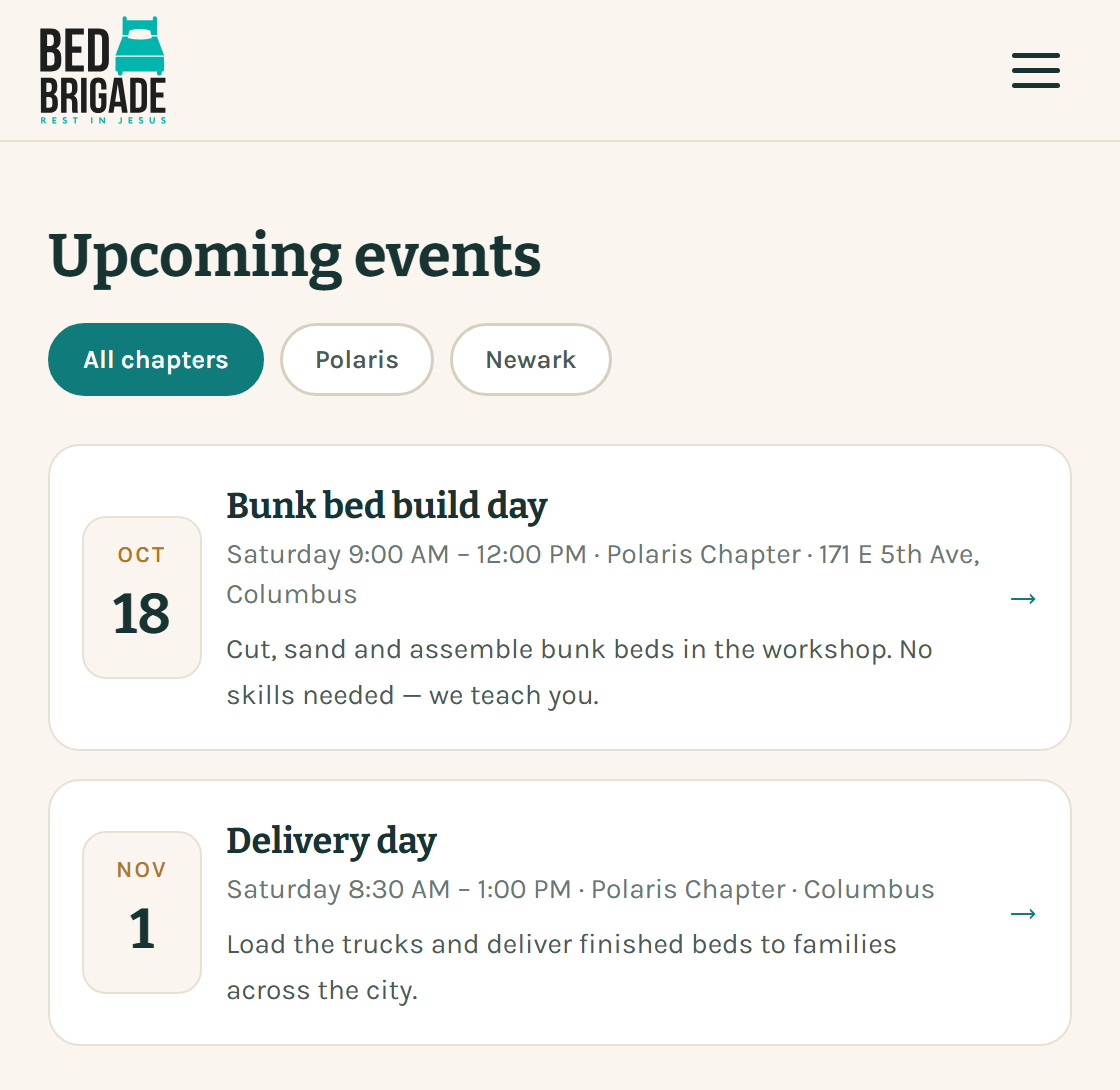
The events page. Each row is one event. Tap the row to open it. Tap the event you want.
-
Tap Sign up to volunteer
A panel slides open with the date, the time, where to go, and the jobs that still need people.
- Build crew · 10 left means ten spots are still open for that job.
- Bedding & linens · Full means that job is taken. Pick another one.
At the bottom are two buttons.
- New to Bed Brigade? Tap Sign up to volunteer.
- Volunteered before? Tap Sign in and skip to step 10.
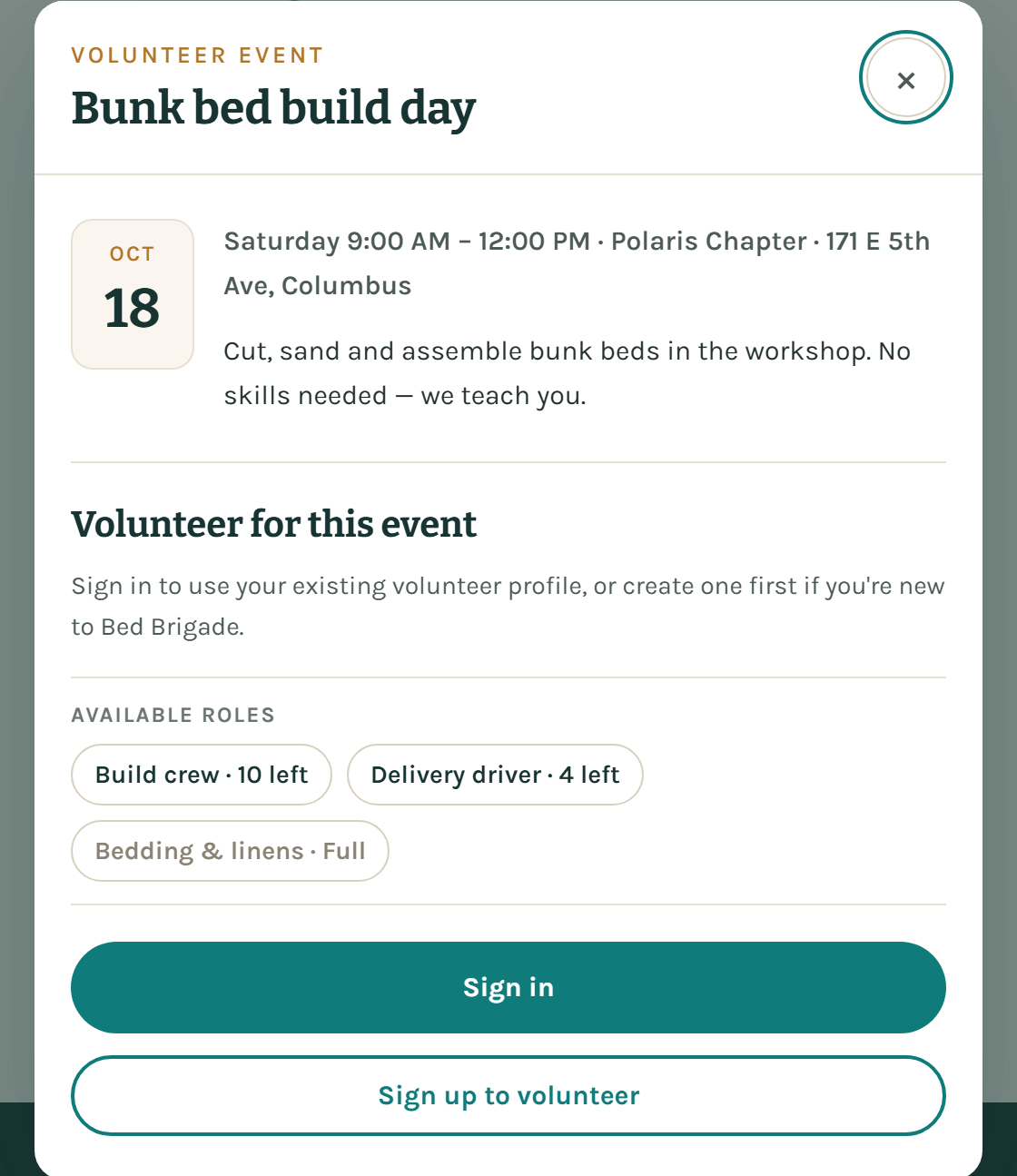
The event panel. The roles show how many spots are left. The two buttons are at the bottom. -
Type your mobile number
A new page opens called Join our team. A row of numbered circles across the top shows how far along you are. You are on step 1, Phone.
Type your mobile number in the Mobile number box.
Leave Signup code (optional) empty. That box is only for a code a Bed Brigade coordinator gave you. It is not the code for joining a friend's team — that is a different page.
Tap Text me a code.
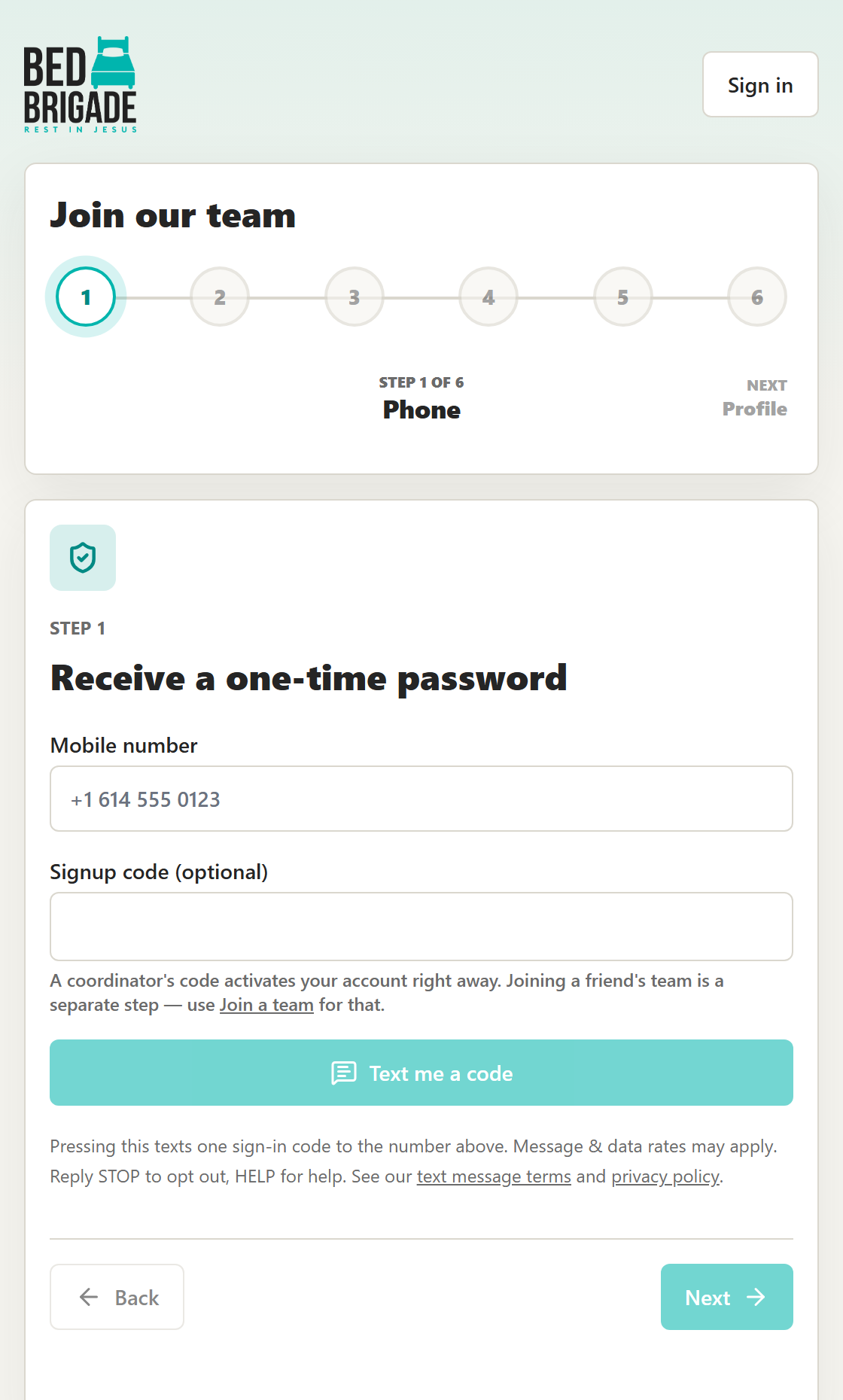
The first step. Only the mobile number is needed here. -
Type the code we text you
We send one text message with a short code in it, six numbers long. Type it into the box marked 6 digit code, then tap Verify code.
DrawingStep 1 of 7Receive a one-time passwordCode sent by text message to (614) •••-01236 digit code4 8 2 9 1 5Verify codeResendEditDrawing, not a photo. What the phone step looks like after you tap Text me a code. If the text does not come:
- Give it a minute. It usually lands in a few seconds.
- Tap Resend to send another one.
- Typed the number wrong? Tap Edit, fix it, and tap Text me a code again.
- Still nothing? Check that your phone can get texts from new numbers.
We do this so nobody can sign up in your name, and so we can reach you if the build day changes.
-
Say how you are joining
Step 2 asks How are you joining? There are two choices. This guide is for signing up on your own, so pick Just me for now and tap Next.
Pick Enter a team code only if someone sent you a code or a link to join their team. If you do, a box appears for the code. Guide 3 covers that.
Choosing Just me for now does not shut anything out. You can join a team or start one later.
-
Add your name and email
Step 3 is Profile. Fill in:
- First name and Last name — you must fill these in.
- Email — put one in. Event details and changes are emailed, and you need an email on file to join a team later.
- Languages — tap any you speak. This is up to you. It helps us send someone who can talk with the family.
Tap Next.
DrawingStep 3 of 7Profile and delivery capabilitiesFirst nameMariaLast nameAlvarezEmailmaria@example.comLanguagesEnglishSpanishChineseTagalogOtherNextDrawing, not a photo. What the profile step asks for. Only the two name boxes and your email really matter. -
Skip the household step if you want
Step 4 is Household members. It asks who lives with you. You do not have to fill it in. Tap Next to move on.
Fill it in if people from your home are coming with you, so we know how many of you to expect.
-
Say whether you can carry beds
Step 5 asks Can you carry beds? The question on the screen is Can you bring a vehicle that can carry beds to a build or delivery? There are two buttons. Tap one.
- Yes, I can carry beds — then tell us about your vehicle: the make, the model, and how many beds fit in it. A bed comes apart into flat pieces, but it still needs a van, an SUV with the seats down, or a pickup.
- No, I'm not bringing a vehicle — tap this and you are done with the step. You do not need a vehicle to volunteer. You can add one later from your profile if that changes.
This is not asking whether you can drive, or whether you have a car. It is asking whether you can haul beds. If you drive a regular car, a bed will not fit in it — tap No, I'm not bringing a vehicle. Saying no here does not stop you coming, and it does not stop you riding along with someone on a delivery.
DrawingStep 5 of 7Can you carry beds?Can you bring a vehicle that can carry beds to a build or delivery?● Yes, I can carry bedsAsks for the make, model and how many beds fit.○ No, I'm not bringing a vehicleNextDrawing, not a photo. The vehicle step. Answering no is a complete answer, not a skipped step. -
Read the waiver and tick the boxes
Step 6 is Terms and consent. There are three tick boxes.
- The waiver. You have to tick this one. A waiver is a short agreement that says you understand what volunteering involves — lifting, power tools, riding in vehicles — and that you are choosing to take that on. Read what is on the screen before you tick it. It is your own agreement. Nobody can tick it for you, and you cannot tick it for anyone else.
- Photos. Up to you. It says you are OK appearing in Bed Brigade photos and stories. Leave it unticked if you would rather not be in pictures.
- Text messages. Up to you. Tick it and we can text you about the builds and deliveries you sign up for — the schedule, a reminder, a last-minute change. It is usually one to four messages around an event. You can stop them any time by replying STOP. Leave it unticked and we will email or call you instead.
DrawingStep 6 of 7Terms and consentTicked: The volunteer waiver. Required. Read it on the screen before you tick it.I am OK appearing in Bed Brigade delivery photos and stories. Up to you.Text me about volunteer days. Up to you. Usually 1–4 messages around an event. Reply STOP to opt out.Complete signupDrawing, not a photo. The three boxes. Only the first one is required. Will I still get my sign-in code if I leave the text box unticked?
Yes. That code is sent because you asked for it by tapping Text me a code. The tick box is about the other messages — reminders and schedule changes. More about our text messages is on the text message page.
Tap Complete signup.
-
Pick your job and confirm
You will see Profile saved. Tap Continue to event. That takes you back to the event you picked in step 1.
Three things to do here:
- Under How are you signing up? choose Just me.
- Under How would you like to help? pick a job. Anything marked Full is taken.
- Tick the box that says Bed Brigade may contact you about this event.
Then tap Confirm event registration.
DrawingSign up for this eventHow are you signing up?● Just meSign up for your own spot.○ Start a groupBring friends, family or coworkers.○ Join a groupSomeone sent you a link or a code.How would you like to help?Build crew · 10 leftDelivery driver · 4 leftBedding & linens · FullTicked: Bed Brigade may contact me about this event. Required.Confirm event registrationDrawing, not a photo. The event signup screen. Choose Just me, pick a job, tick the box, confirm. You are done when the screen says You're registered. Your name is now on the list the coordinators see. Watch for an email with the details.
If something goes wrong
- The text never arrives
- Tap Resend. If it still does not come, tap Edit and check the number, digit by digit.
- Every job says Full
- The event has all the people it needs. Pick a different date on the events page, or ask your chapter whether they can open more spots — they sometimes do, closer to the day.
- It says you are already registered
- You are in. That message means it went through the first time. Nothing else to do.
- You get stuck partway
- Nothing you typed is lost. Close it, open the event again, and tap Sign in. You will land back where you were.
Who to ask
Ask your local chapter — the people running the build. Their phone number is on your chapter page. If someone invited you, ask them first; they are the quickest answer.